What Pages Should Every Business Website Have?
Every business website needs a core set of pages to build trust and guide visitors to act. Here's the checklist and why each page earns its place.
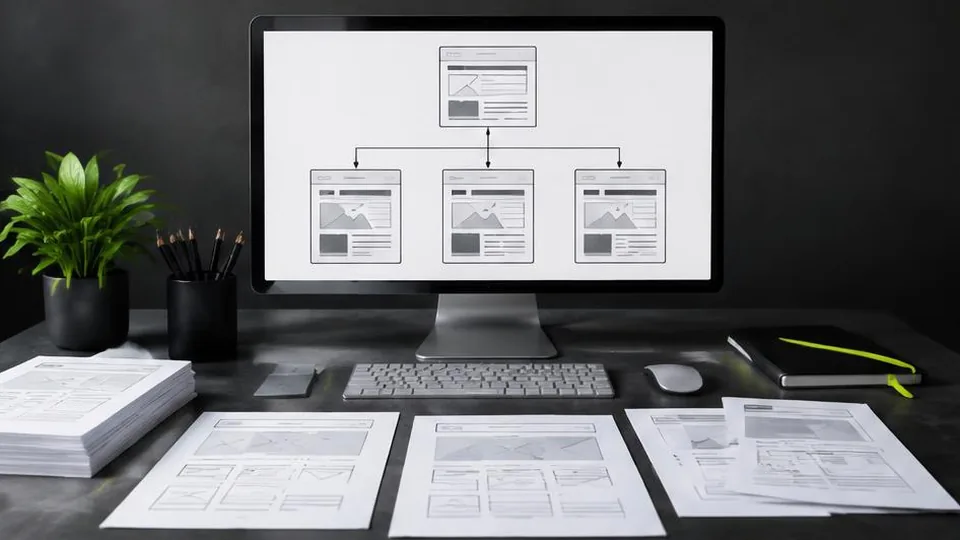
Every business website should include a homepage, an about page, a services or products page, a contact page, and some form of social proof like testimonials or case studies. Beyond these core pages, the right additions depend on your industry and how customers search for businesses like yours.
Skipping any of these core pages usually means lost trust or lost leads — visitors either can't find what they need or don't feel confident enough to reach out. Here's what each one should do.
The homepage
Your homepage is often the first impression a visitor forms of your business, so it needs to answer three questions almost immediately: what do you do, who is it for, and what should I do next. It should include:
- A clear headline describing what your business offers
- A short explanation of who you serve and what makes you the right choice
- Visual proof — photos of your work, product, or space
- A clear call to action, whether that's "Book Now," "Get a Quote," or "Contact Us"
The about page
Customers want to know who they're dealing with, especially for local and service-based businesses. A good about page includes your story, your experience, and what you stand for — but keep it focused on how that benefits the customer, not just a history lesson about your company.
Services or products pages
This is where many businesses either succeed or fall short. If you offer multiple distinct services, each deserves its own page with details on what's included, who it's for, and how to get started. If you offer one core service, a single well-written page is enough. This decision connects directly to whether a one-page or multi-page website structure suits you better.
Testimonials or case studies
Social proof reduces hesitation. Genuine feedback from past customers, case studies showing results, or simply a gallery of completed work all help build the trust that gets someone to contact you instead of a competitor. Never fabricate quotes or results here — use only real feedback you actually have.
FAQ page
An FAQ page answers the common hesitations that stop people from reaching out — questions about pricing, process, timelines, or what to expect. This page can also reduce repetitive inquiries by answering questions upfront.
Contact page
This page should make it as easy as possible to reach you: a contact form, phone number, email, physical location if relevant, business hours, and a map if you serve customers in person. Every other page on your site should point back here in some way.
Industry-specific pages worth considering
- Restaurants: menu page, reservations, photo gallery
- Clinics and salons: booking page, individual treatment pages, staff bios
- Real estate: property listings page, individual listing pages, agent profiles
- E-commerce businesses: shop or product catalog, individual product pages, cart and checkout — see our e-commerce services for building this properly
A simple page checklist
| Page | Essential for most businesses | Notes |
|---|---|---|
| Homepage | Yes | First impression and main navigation hub |
| About | Yes | Builds trust and context |
| Services/Products | Yes | Core of what you offer |
| Contact | Yes | Converts interest into inquiries |
| Testimonials | Strongly recommended | Builds confidence to act |
| FAQ | Recommended | Reduces hesitation and repeat questions |
| Blog | Optional | Helps SEO if maintained consistently |
| Gallery | Depends on industry | Essential for visual businesses like restaurants or salons |
Common mistakes in page planning
- Treating every page as equally important. Not every page needs the same amount of attention; the homepage and contact page usually deserve the most care.
- Burying the contact information. If visitors have to hunt for a phone number or form, they'll leave instead of searching further.
- Writing for yourself instead of the customer. Pages that describe your company history in detail but never explain the customer benefit tend to underperform.
- Launching with placeholder text. "Lorem ipsum" or generic stock copy left in place after launch damages credibility and rarely gets fixed later.
- Adding pages nobody asked for. A blog that's never updated or a "news" page with one old post looks worse than not having it at all.
A short example: two service-page approaches
Imagine two local businesses offering three services each. The first lists all three briefly on one combined page with no detail. The second gives each service its own page with specifics on what's included, who it's for, and a clear next step. The second approach almost always performs better — both for visitors trying to decide and for search engines trying to understand what the business offers, since each page can be written around how customers actually search for that specific service.
Questions to ask yourself about each page
- What should a visitor understand or decide after reading this page?
- What's the single action I want them to take next?
- Is there anything on this page that only matters to me, not the customer?
- Could this page be merged with another without losing clarity?
- How will I keep this page accurate and current over time?
Running through these questions for every page — even a simple contact or about page — tends to surface gaps that are easy to miss when building a site in a hurry.
Planning your pages before design begins
A common mistake is jumping straight into design before deciding what content belongs on each page. Planning your pages first — what each one needs to communicate and in what order — makes the design process faster and the final site more effective. This is a core part of any proper web design process, and it's also worth revisiting during a website redesign if your current site's pages feel disorganized or incomplete.
If you're not sure which pages your specific business needs, a short consultation can clarify this quickly based on your industry and goals — contact us to talk it through, or explore our work to see how different businesses have structured their sites.
Frequently asked questions
What is the most important page on a business website?
The homepage and the contact page together matter most, since the homepage earns a visitor's trust in seconds and the contact page converts that trust into an inquiry.
Do I need a blog on my business website?
A blog isn't essential for every business, but it helps with search visibility and establishing expertise if you can commit to posting regularly.
How many pages does a small business website need?
Most small businesses do well with five to eight core pages: home, about, services, individual service pages if relevant, testimonials, FAQ, and contact.
Should every service have its own page?
If you offer more than two or three distinct services, dedicated pages help both visitors and search engines understand what you do and improve your chances of ranking for each one.
Related articles
One-Page vs. Multi-Page Websites: Which Is Better?
Neither structure is better in general — the right choice depends on what your business sells, how customers search, and how much content you need.
October 10, 2026
Website Redesign: When and Why Your Business Needs It
A website redesign is more than a new look — it's a chance to fix what's quietly costing you customers. Here's how to know it's time.
October 10, 2026
Affordable Website Design: What Small Businesses Should Know
Affordable doesn't have to mean cheap or risky. Here's how small businesses can get real value from a website without overspending or underbuilding.
October 10, 2026